Core concepts
This guide introduces the core concepts behind building AR applications with the Niantic Spatial Development Kit (NSDK) and explains how it operates so you can design stable AR experiences.
It is intended for developers new to AR or 3D systems, as well as experienced developers who want to understand how pose, tracking, localization, coordinate spaces, transforms, and anchors work together.
AR applications maintain a continuously updated pose, an estimate of the device’s position and orientation in space.
- Tracking updates the device pose over time within a session.
- The pose is expressed in a coordinate space.
- Localization aligns that space to the real world.
- Anchors use that alignment to keep content fixed as the NSDK updates.
The following sections describe how these components work together.
Understand AR systems
Augmented reality (AR) applications overlay digital content onto the physical world using a device’s camera and sensors. Unlike traditional 2D applications, AR systems are not driven by discrete events. They operate as continuous systems that update and render the scene every frame.
Frames are produced in a continuous update loop, where sensor inputs are processed to produce the current system state used for rendering.
Frames and update loop
In traditional 2D applications, developers think in terms of events. A button click changes state. A network response updates data. The interface redraws when something changes.
In AR and other 3D systems, the state changes continuously. Device pose, sensor input, and alignment estimates can update faster than the framerate. If the NSDK tried to emit an event for every change, it would quickly overwhelm the system.
Instead, 3D applications render from the latest available state each frame.
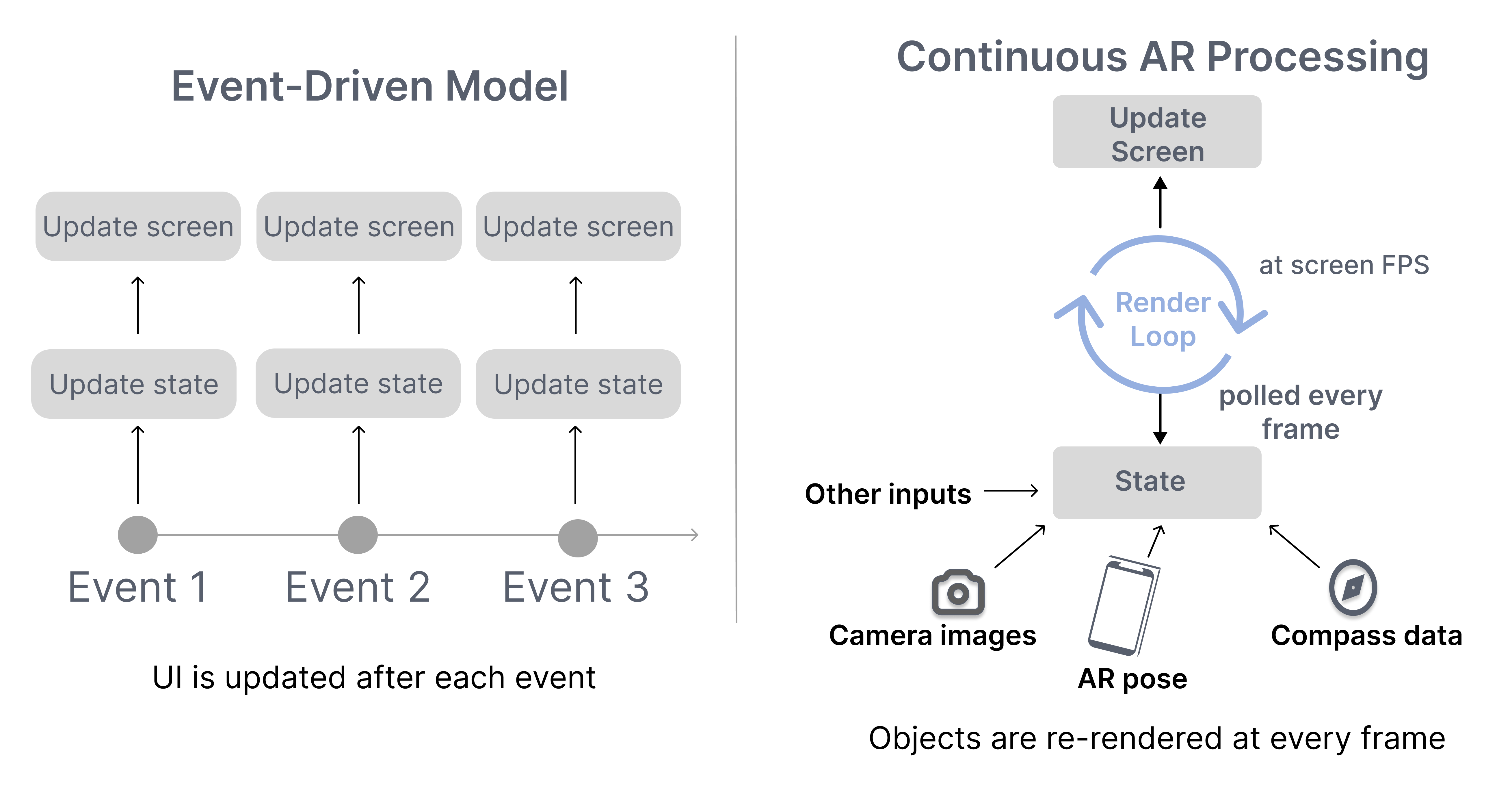
The key shift is:
- In 2D systems, you react to state changes.
- In 3D systems, you render the current state each frame.
A 3D application does not need every intermediate state change. It only needs the most recent state when drawing the next frame. Performance depends on computing each frame efficiently within a limited time budget.
As long as the application is active, the NSDK continuously:
- Reads the latest sensor data from the device.
- Estimates the device’s position and orientation.
- Updates the scene state.
This sequence repeats continuously for the entire duration of the session.
Because every frame must be produced within a limited time budget, developers must design their code around the render loop:
- State must be treated as continuously changing.
- Applications must use the most recent available state.
- Each update should be quick so it doesn't block the render loop.
The following section describes the inputs that drive the system and the outputs it produces.
System inputs and outputs
The AR system operates by consuming live sensor data and producing spatial state.
Inputs can include:
- Camera frames
- Inertial sensor data
- GPS signals
- User input
Outputs can include:
- Device pose estimates
- Anchor poses
- Localization status
- 3D representations of the environment including meshes or splats
The NSDK processes inputs continuously and makes the latest outputs available to be queried by each frame during rendering.
Establish spatial state
AR systems maintain a continuously updated representation of the device in space. This representation is expressed as a pose and updated over time by tracking.
A pose is only meaningful within a coordinate system. Coordinate spaces define how that pose is expressed, whether relative to the current session, a mapped environment, or the Earth.
Together, pose, tracking, and coordinate spaces define the spatial state that is used throughout the NSDK.
Pose
A pose represents the position and orientation of an entity in 3D space, commonly represented using two 3D vectors or a single 3D vector and a quaternion.
- Position — where something is
- Orientation — how it is rotated
Every entity's location in the NSDK is described by a pose, including the device, anchors, and virtual objects.
Pose is the spatial state that is updated by the NSDK and used throughout it:
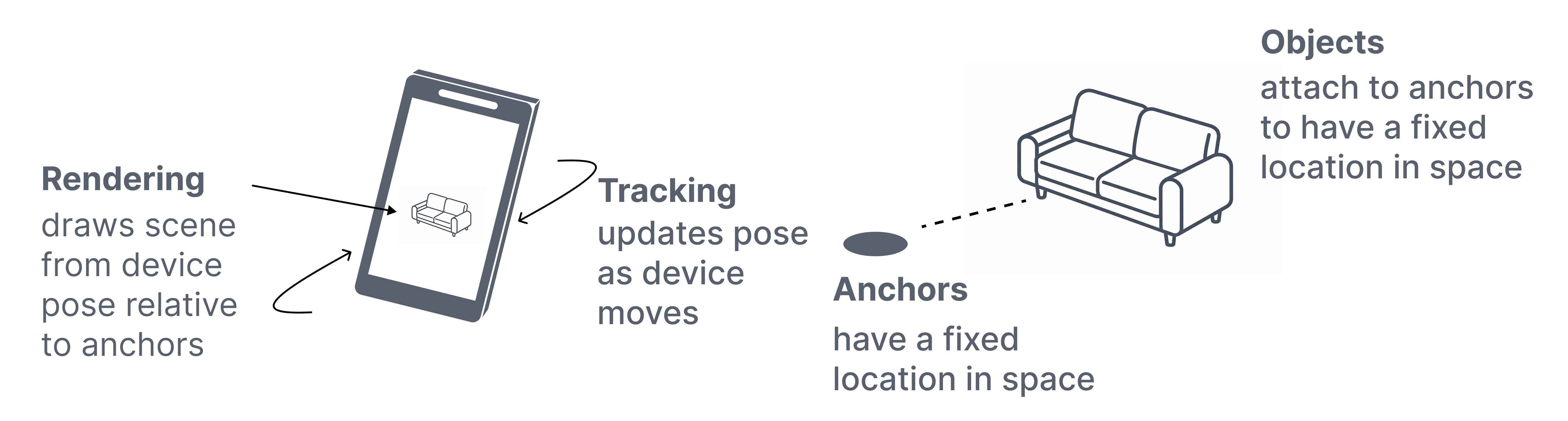
- Tracking updates the device pose over time.
- Anchors store and resolve poses within a coordinate space.
- Rendering uses the latest pose to draw the scene.
Pose is always interpreted within a coordinate system, which is described in the next section on coordinate spaces.
Tracking
Tracking updates the device’s pose over time using camera imagery and inertial sensor data.
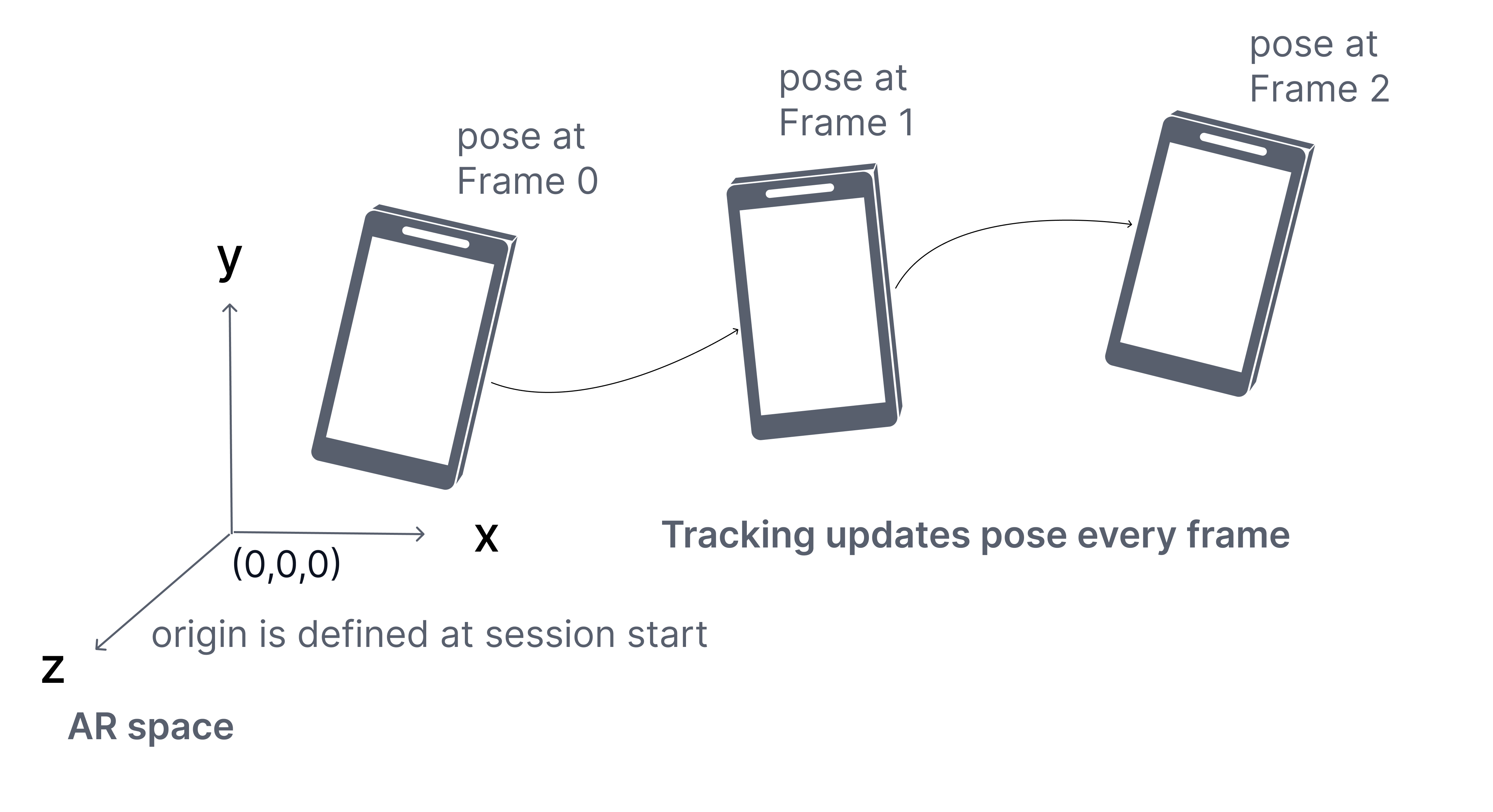
When an AR session begins, the NSDK defines an AR coordinate space and begins estimating the device’s position and orientation relative to that starting point.
This estimate provides:
- Smooth short-term motion
- Stable relative positioning
- A consistent frame of reference for the session
Tracking describes how the device moves within the session, but it only determines the device pose relative to the session origin, not to a real-world reference. It does not establish the device’s position in a world-aligned coordinate space.
Tracking is an estimation process and is always subject to small errors. Over time, these errors can accumulate if they are not corrected. When this accumulation causes the estimated pose to diverge from the true device position, it is referred to as drift.
To interpret a pose, you must consider the coordinate space in which it is defined.
Coordinate spaces
Every pose exists within a coordinate space. Interpreting pose data requires knowing the coordinate space in which the pose is expressed.
A coordinate space defines:
- An origin
- An orientation or a set of axes
- A unit scale, in meters for Unity, ARKit, and ARCore
Coordinate systems
Unity, ARKit, and ARCore use different coordinate system conventions, especially for the direction of the Z axis:
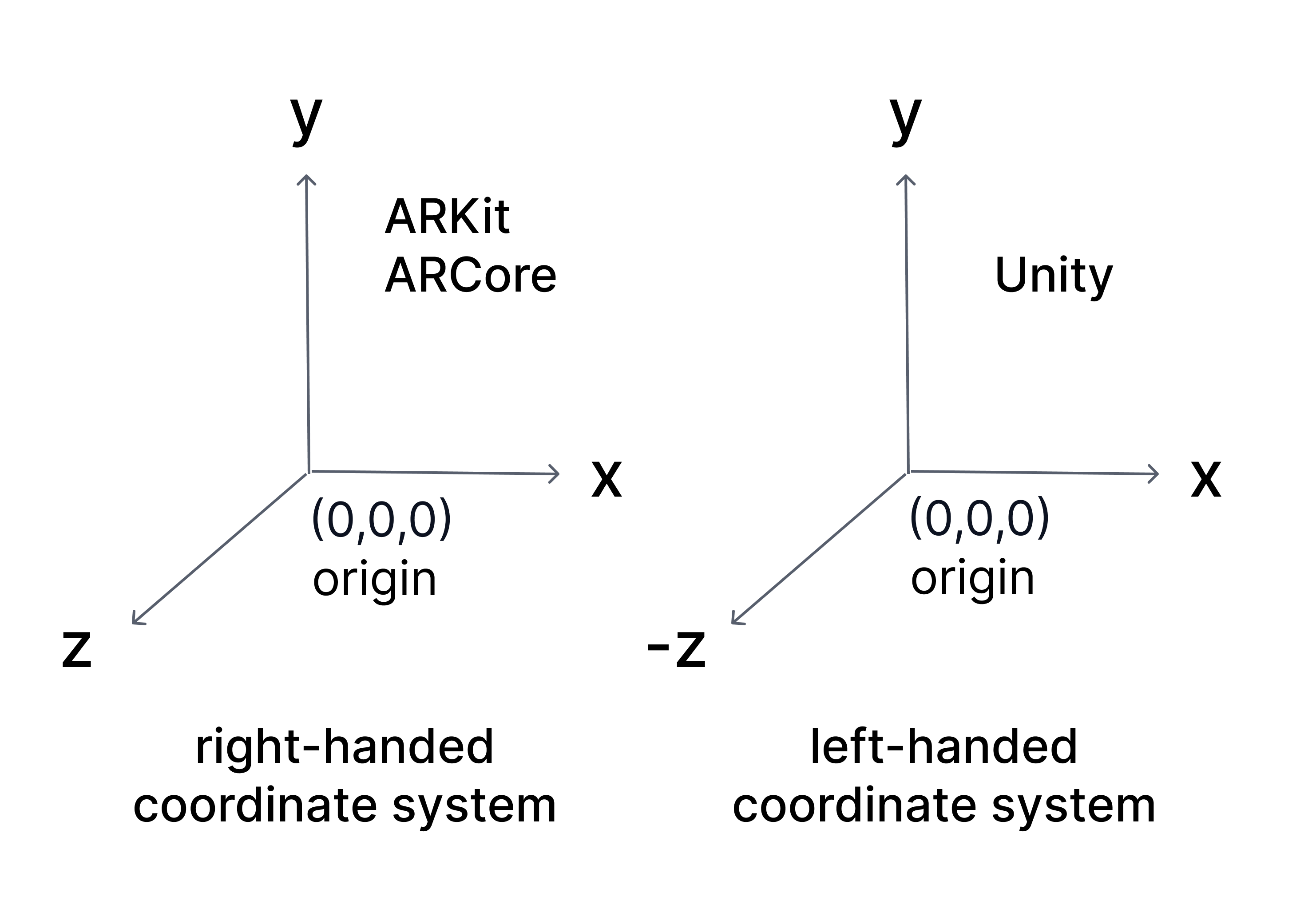
Unity: left-handed coordinate system
- X → right
- Y → up
- Z → forward
ARKit and ARCore: right-handed coordinate systems
- X → right
- Y → up
- -Z → forward, into the scene
- +Z → toward the viewer
Coordinate space expressions
The same physical device position can have different numerical values depending on which coordinate space is used. Comparing, storing, or applying poses without knowing their coordinate space can produce incorrect spatial behavior. A pose expressed in AR space is not directly interchangeable with a pose expressed in map-relative or global space.
Poses are expressed in different coordinate spaces depending on context:
| Space | Reference frame | Measurement characteristics | Behavior | Use case |
|---|---|---|---|---|
| Global space | Earth | Accuracy depends on measurement source such as GPS | Stable reference frame tied to Earth | Identifying real-world locations |
| AR space | Session origin | High local accuracy near the origin; error accumulates with motion and poor features | Session-bound; resets each session | Placing content within a session |
| Map-relative space | Mapped environment | High accuracy when localized to the map | Stable across sessions once localized | Persistent and shared world-aligned content |
Global space
Global space expresses a pose as a position on Earth using geographic coordinates.
- Latitude
- Longitude
- Altitude
- Heading
It is used to identify locations at a large scale. GPS provides global coordinates directly, and mapped environments can be associated with global coordinates when available.
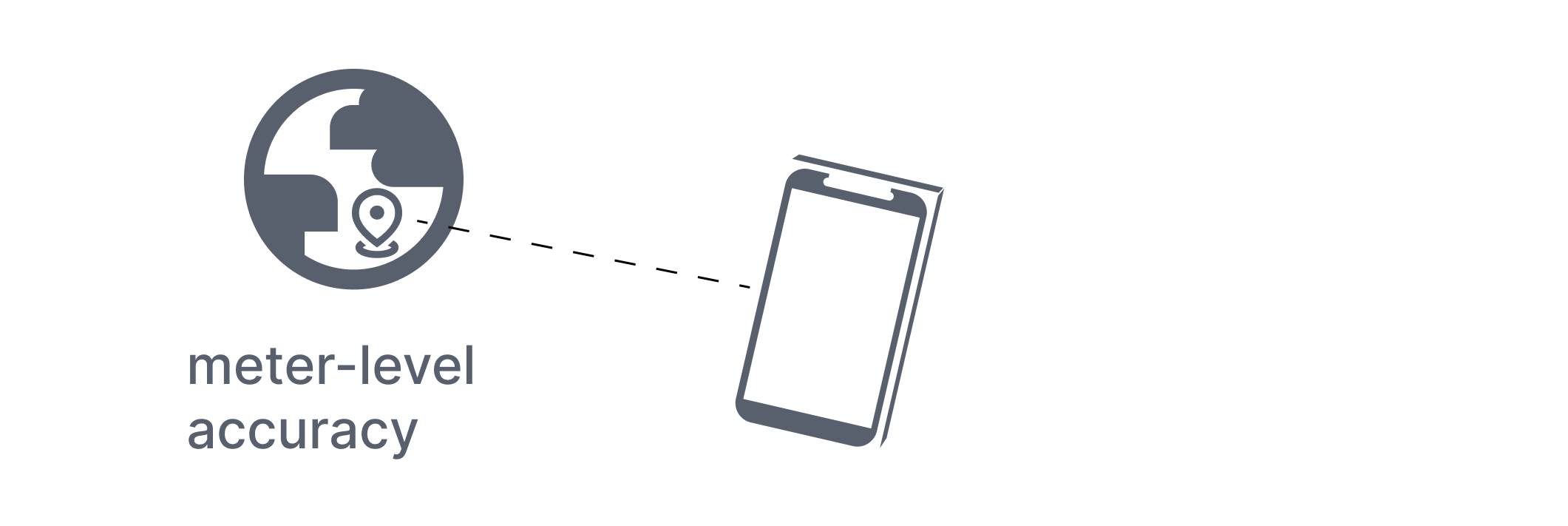
Global space is designed for Earth-scale positioning. While the coordinate system itself can represent positions with high precision, the accuracy of real-world measurements, such as from GPS, is often limited. This makes it unsuitable for precise placement within a room.
AR space
AR space expresses a pose relative to where the session began.
- The origin is defined at the start of the session.
- Units are expressed in meters.
- Axes remain consistent for the duration of the session.
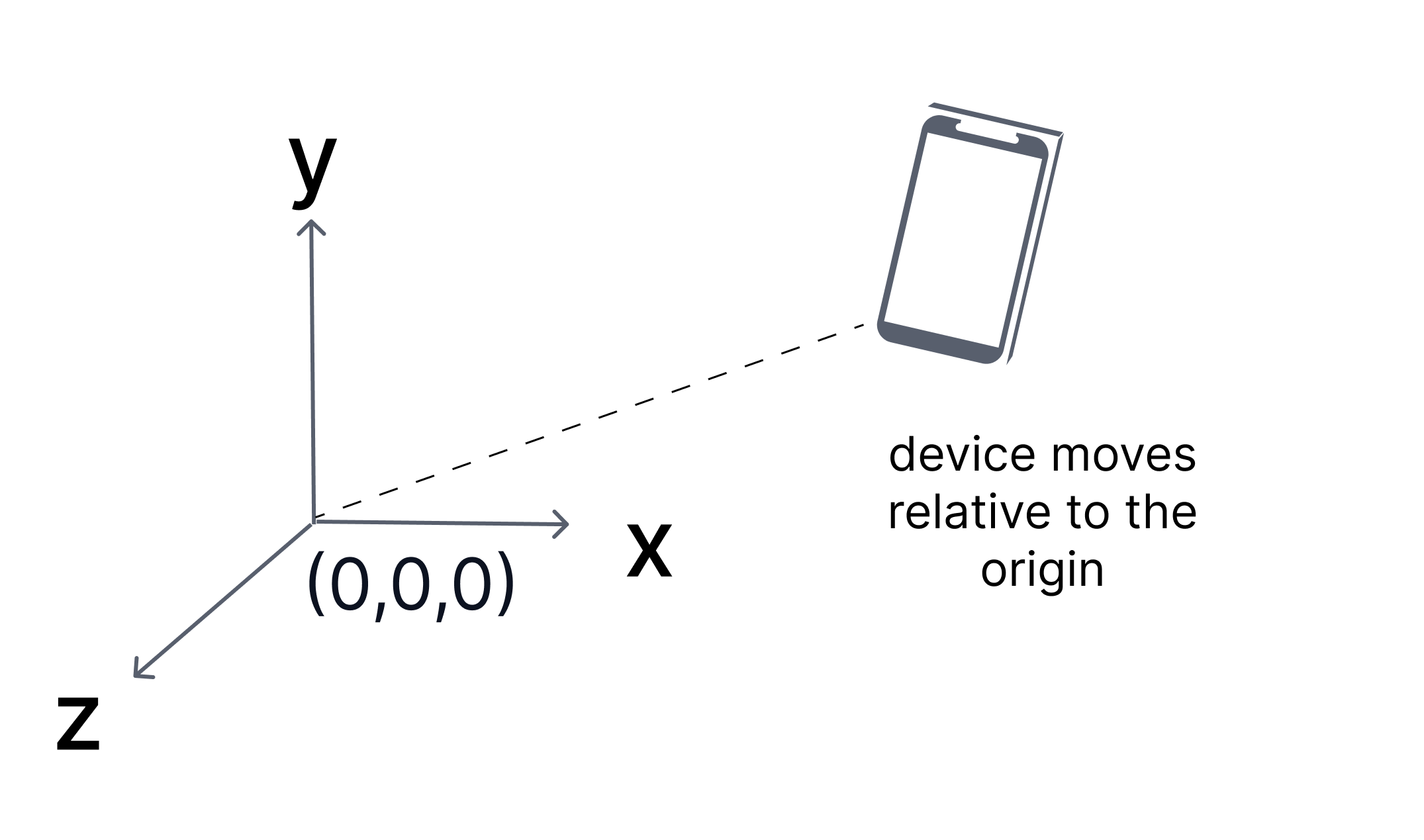
Tracking operates within AR space by estimating the device pose relative to the session origin.
AR space provides high precision for local interactions, but that precision is not uniform:
- Accuracy depends on the quality of visual features in the environment.
- Error accumulates as the device moves farther from the origin.
- Poor or repetitive environments can reduce tracking stability.
As a result, the estimated pose may gradually diverge from the true device position.
AR space is also session-bound:
- The coordinate system resets when the session ends.
- Poses from one session cannot be reused in another without a shared reference.
Without localization, all poses remain relative to the current session only.
Map-relative space
Map-relative space expresses a pose relative to a mapped real-world environment, such as a VPS map.
These maps are created from image-based scans and define a local reference frame for that environment. By default, they do not have a real-world location.
Some maps are geo-referenced, meaning they are associated with a known real-world location, including latitude, longitude, altitude, and heading. Only geo-referenced maps can be related to global coordinates.
- The origin and axes are tied to that environment.
- Units are expressed in meters.
- Positions remain consistent across sessions once localized.
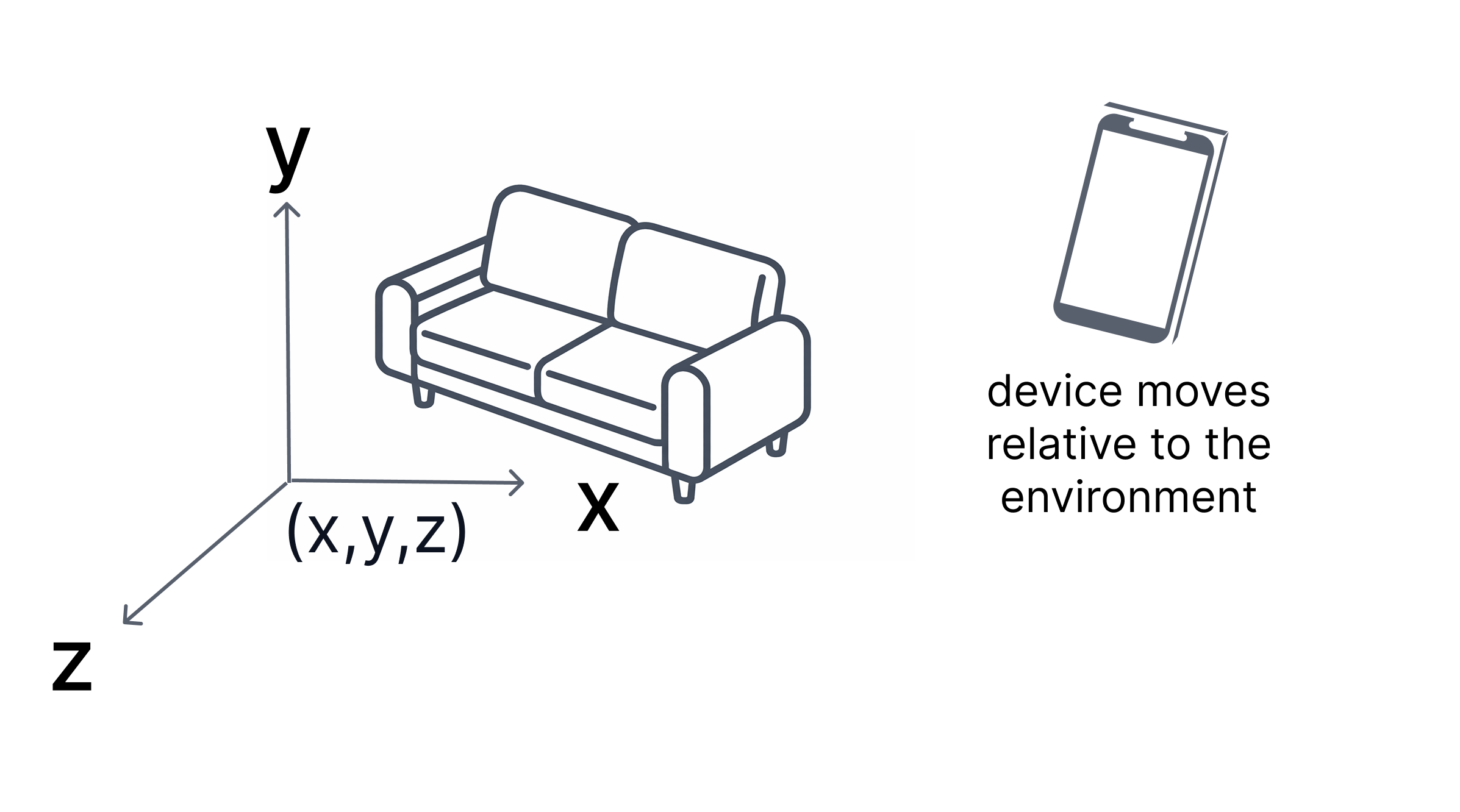
A map does not always have a known real-world location. For example, a map that has been scanned or created locally does not have a real-world location unless it has been geo-referenced.
Unlike AR space, which is relative to the session, map-relative space is anchored to the environment. This allows content to remain fixed in the same real-world location over time.
Transforms
A transform defines the relationship between two coordinate spaces. It describes how one coordinate space is positioned and oriented relative to another, including the translation and rotation between their origins.
Applying a transform allows a pose expressed in one space to be converted into an equivalent pose in another space.
Coordinate space relationships
There are three coordinate spaces in the NSDK:
- AR space — defined by the current session.
- Map-relative space — defined by a mapped environment.
- Global space — defined by Earth coordinates.
Transforms represent the relationships between these spaces:
- AR space ↔ map-relative space.
- Map-relative space ↔ global space.
When transforms are available
Transforms exist only when the NSDK knows how two spaces relate:
- The AR–map relationship is established by VPS localization.
- The map–global relationship exists only if the map is geo-referenced.
At runtime:
- Without localization, poses exist only in AR space.
- After localization, AR and map-relative poses can be converted.
- If the map is also geo-referenced, poses can be converted to global coordinates.
Composing transforms
Transforms can be combined. When both relationships are available:
- AR → map
- map → global
For example, a pose in AR space can be converted to global space by applying both transforms in sequence.
These transforms are computed and provided by the NSDK.
Common conversions
| From | To | Requires | Example use case |
|---|---|---|---|
| Global | AR space | Localization + geo-referenced map | Align AR content to a known real-world location |
| Global | Map-relative | Geo-referenced map | Position GPS-based data within a mapped environment |
| AR space | Global | Localization + geo-referenced map | Share an AR placement using real-world coordinates |
| AR space | Map-relative | Localization | Save a placed object so it stays in the same real-world position later |
| Map-relative | Global | Geo-referenced map | Store or report the real-world location of a mapped object |
| Map-relative | AR space | Localization | Display previously saved world-aligned content in the current AR session |
In practice:
- XRVps2Subsystem provides an XRVps2Transformer representing the current alignment between AR space and a real-world reference.
- Conversion methods on
XRVps2Subsystemuse this transformer to convert poses between coordinate spaces.
Anchor and place content
An anchor defines a stable reference pose in a coordinate space.
Applications attach virtual content to anchors rather than directly to the device pose. Anchors separate content from device motion.
An anchor consists of:
- A position
- An orientation
- A coordinate space in which that pose is defined
An anchor has two states:
- Limited — coarse alignment
- Tracked — high-confidence alignment
The coordinate space determines how the anchor behaves:
- In AR space, an anchor remains stable relative to the session origin.
- In map-relative space, an anchor remains fixed in the environment.
- In global space, an anchor aligns to geographic coordinates.
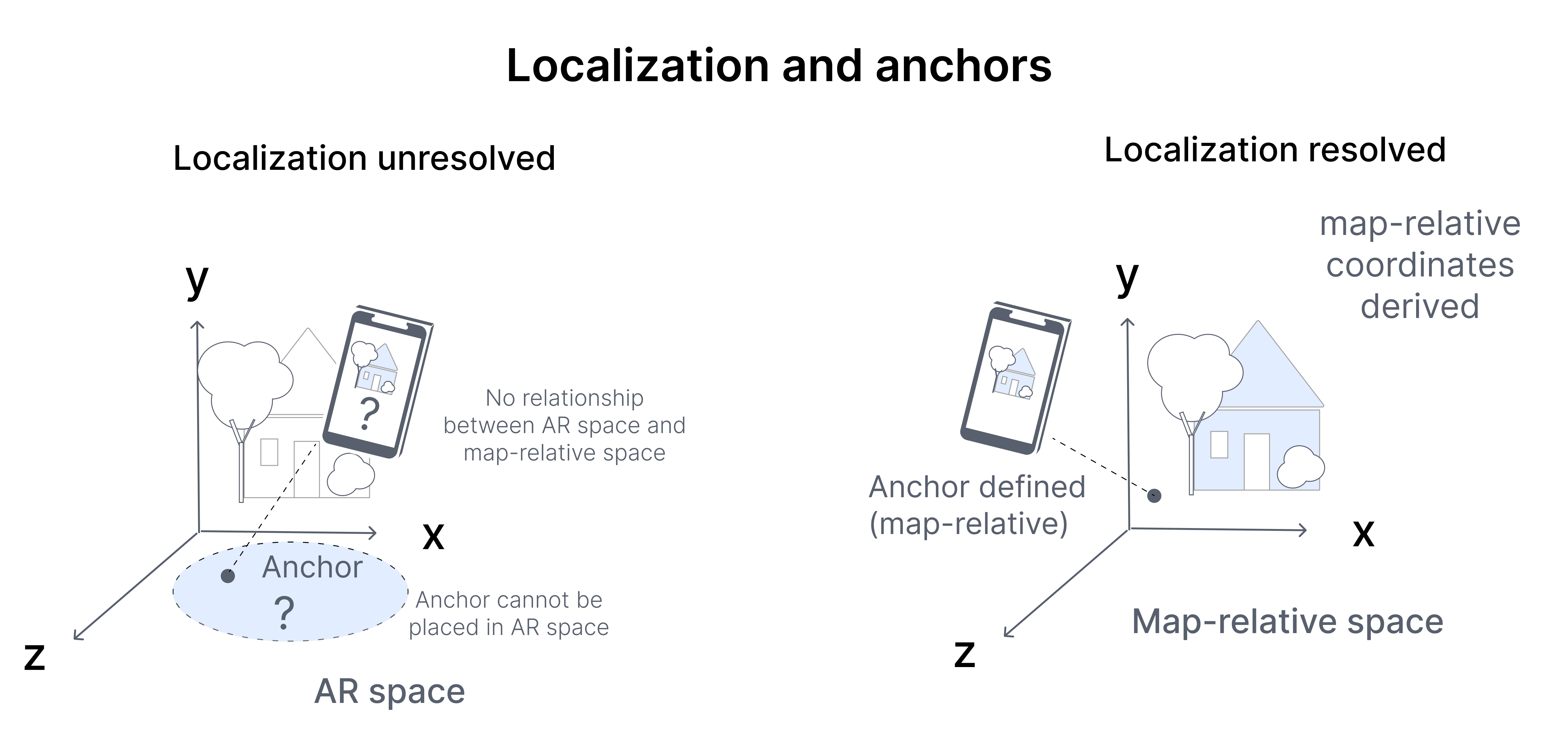
Anchors are resolved using the current relationship between coordinate spaces. That relationship may change from frame to frame as the device moves and the alignment is updated.
- Anchors defined in the environment may shift slightly in AR space.
- Content attached to those anchors will update accordingly.
Because of this changing relationship, anchor poses should be treated as dynamic:
- Do not cache anchor transforms indefinitely.
- Always use the latest anchor pose when rendering.
- Monitor localization state when alignment to the real world is required.
VPS localization
Localization determines how the current session relates to a known reference.
In the NSDK, localization is performed using VPS. VPS localization computes the alignment between AR space and a VPS map, which represents a previously mapped real-world environment.
This alignment is estimated by matching live camera input to the VPS map.
When sufficient features match, VPS establishes a relationship between AR space and the external reference space. The resulting relationship is represented as a transform that allows the current pose to be interpreted relative to that reference.
Tracking continues updating the device pose each frame. VPS localization updates how that pose is interpreted across coordinate spaces.
Until VPS localization resolves:
- The device pose exists only in AR space.
- Map-relative coordinates or global coordinates are not yet defined.
- Content can be placed locally but cannot be reliably aligned to the real world.
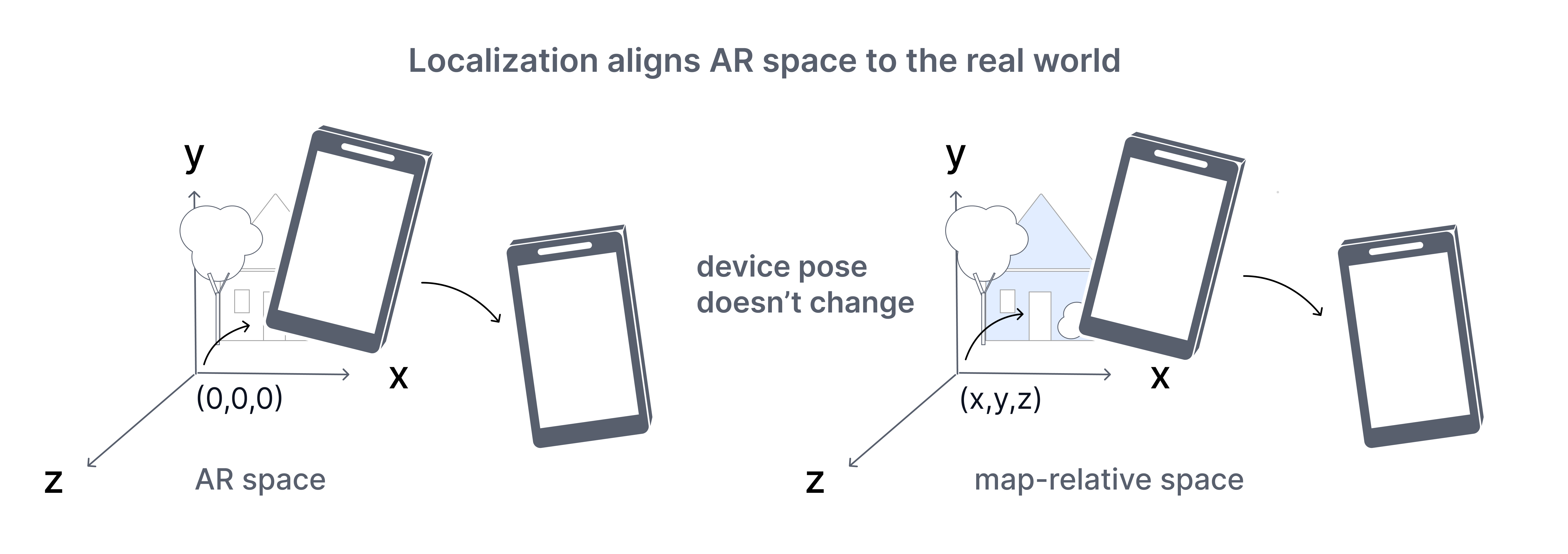
As VPS localization updates, the relationship between coordinate spaces may change:
- Anchors defined in the environment may shift slightly in AR space.
- Converted coordinates may update.
VPS localization quality depends on environmental conditions, feature visibility, and map coverage. NSDK may report states such as:
- Coarse — lower confidence, low precision alignment.
- Precise — high-confidence, high precision alignment.
Next steps
Continue with the following topics based on where you are in your workflow:
Set up and prepare
- Account - Set up Scaniverse to create, manage, and share VPS maps for NSDK applications.
- Get started with VPS2 - Set up and configure VPS2 in Unity to enable localization and persistent AR anchors.
Localize your first experience
- First localization - Scan an environment, generate VPS assets, and localize a device to that location in an app.
Place and persist content
- Place virtual content with VPS2 - Create, track, and persist anchors to place accurate AR content across sessions.
Work with global positioning
- Use geoposition with VPS2 - Convert between AR poses and global coordinates using VPS2 transformer and accuracy-aware estimates.